Peritas Portal Frame Builder & Structural Automation
A production Revit add-in automating structural modelling, documentation and repetitive engineering workflows for industrial portal-frame buildings.
- Platform
- Autodesk Revit
- Compatibility
- Multi-Version
- Delivery
- Enterprise Add-in
- Quality
- Automated Testing
- c-sharp
- dotnet
- revit-api
- wpf
- structural-engineering
- software-architecture
- automation
Evidence
Client-confidential — walkthrough available on request
Overview
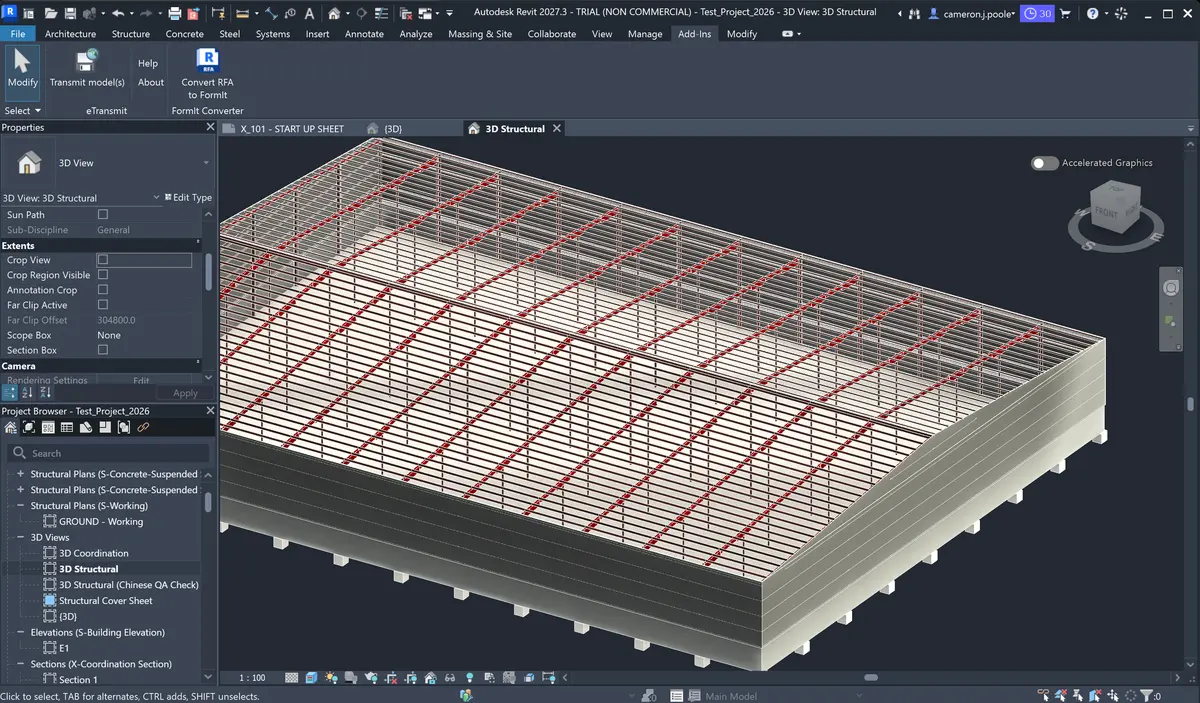
The Portal Frame Builder is a production Autodesk Revit add-in developed for Peritas Structural Engineers to automate the modelling and documentation of industrial steel buildings.
The application translates engineering design inputs into coordinated Revit geometry for portal frames and associated structural elements, including canopies, crane structures, secondary framing, wall systems and openings.
What began as a collection of prototype automation tools evolved into a maintainable, multi-version software product used within the engineering workflow. My role has covered application architecture, Revit API development, user-interface design, testing, deployment and the ongoing development of new automation capabilities.
Engineering Approach
The project is designed around three priorities: making complex engineering workflows easier to use, separating reusable engineering logic from Revit-specific implementation, and ensuring the application can be maintained as Autodesk’s platform evolves.
1. Revit Workflow Automation
The add-in automates repetitive modelling operations that would otherwise require significant manual setup and coordination.
Engineers define the key characteristics of a structure through a purpose-built interface, with the application generating and coordinating the corresponding structural elements within the Revit model.
This allows common building configurations to be created consistently while retaining the flexibility required for project-specific engineering decisions.
2. Maintainable Multi-Version Architecture
The application has evolved alongside major changes to the Autodesk Revit development platform.
Rather than maintaining separate implementations for each Revit release, the software is structured around a shared core with limited version-specific integration. This reduces duplicated development effort and makes it easier to support multiple Revit versions from the same codebase.
The architecture also isolates engineering and geometric logic from the Revit API where practical, making the system easier to maintain, extend and test.
3. User Interface & Configuration
A dedicated desktop interface provides engineers with structured control over portal geometry, member arrangements and secondary structural features.
Configuration can be retained and reused between sessions, allowing common arrangements to be revisited without repeatedly entering the same information.
The interface and application state have been designed to support continued expansion as additional structural workflows are incorporated into the product.
4. Testing & Reliability
Automated testing is used for important engineering and geometry behaviour without requiring every test to run inside Autodesk Revit.
Separating core calculations from the host application provides faster development feedback and helps identify regressions as the application evolves.
This is particularly valuable for geometric workflows where small changes can affect multiple structural configurations and building arrangements.
5. Enterprise Deployment
The application is distributed through managed Windows installers rather than manual file deployment.
Versioning, packaging and installation have been standardised so releases can be deployed consistently across engineering workstations while supporting the requirements of different Revit versions.
This transformed the project from an internal development tool into a maintainable production application with a repeatable release process.
Key Outcomes
- Automated substantial portions of portal-frame modelling and documentation within Autodesk Revit.
- Reduced repetitive modelling work while improving consistency across structural models.
- Developed a reusable architecture capable of supporting multiple Revit releases and continued feature development.
- Introduced automated testing for core engineering and geometric behaviour outside the Revit runtime.
- Established a repeatable packaging and deployment process suitable for production use across engineering workstations.
- Created a foundation for progressively automating additional structural engineering workflows as requirements evolve.